Toggle navigation
Partner Store
×
What can we help you find?
Search
BROWSE BY TOPIC
View all products
Shop by category
Exam vouchers
Learning materials
Cart
0
Help
Regional Marketplace:
View
All Products
Shop by Category
Exam Vouchers
Learning Material
Submit Search
Submit Search
Help
Cart
0
Sign in
Did you know...
You can look up your vouchers and usage in your order history?
To do this, follow these three steps:
1

Go to My Account
2
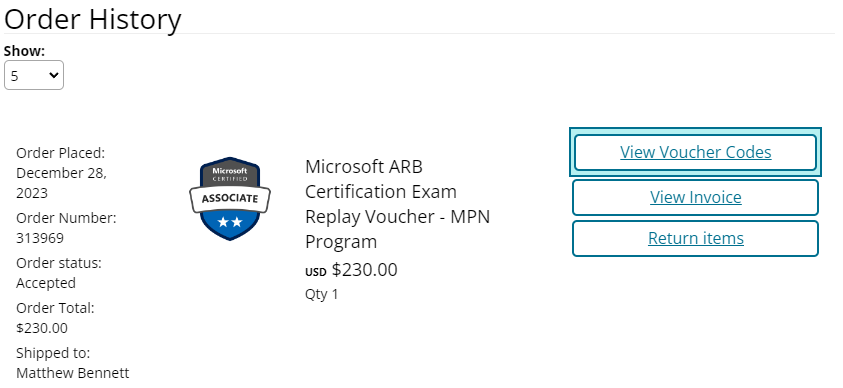
Under "Order History" you will see a link "View Voucher Codes". Click this:
3
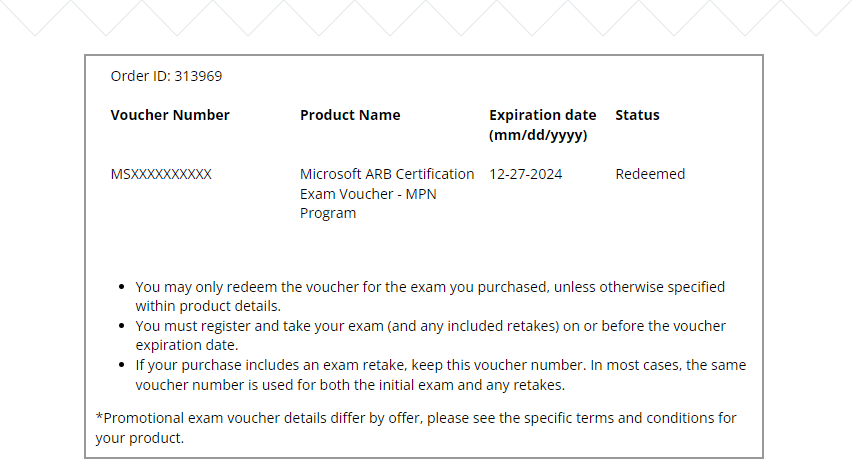
You will now see your voucher codes, their expiration dates, and the status of each voucher.
Notes:
If you do not see the link please note it takes up to 1 business day after voucher fulfillment via email to see these.
A status of "Redeemed" indicates the voucher was used to take an exam or with an exam appointment that has passed.
If "Expired" they have been fully expired.
More advanced voucher management is coming in 2024!